01
✓
Follow this Valgrind memory leak tutorial to detect leaks, understand Memcheck output, and fix invalid reads or frees in C/C++ code.
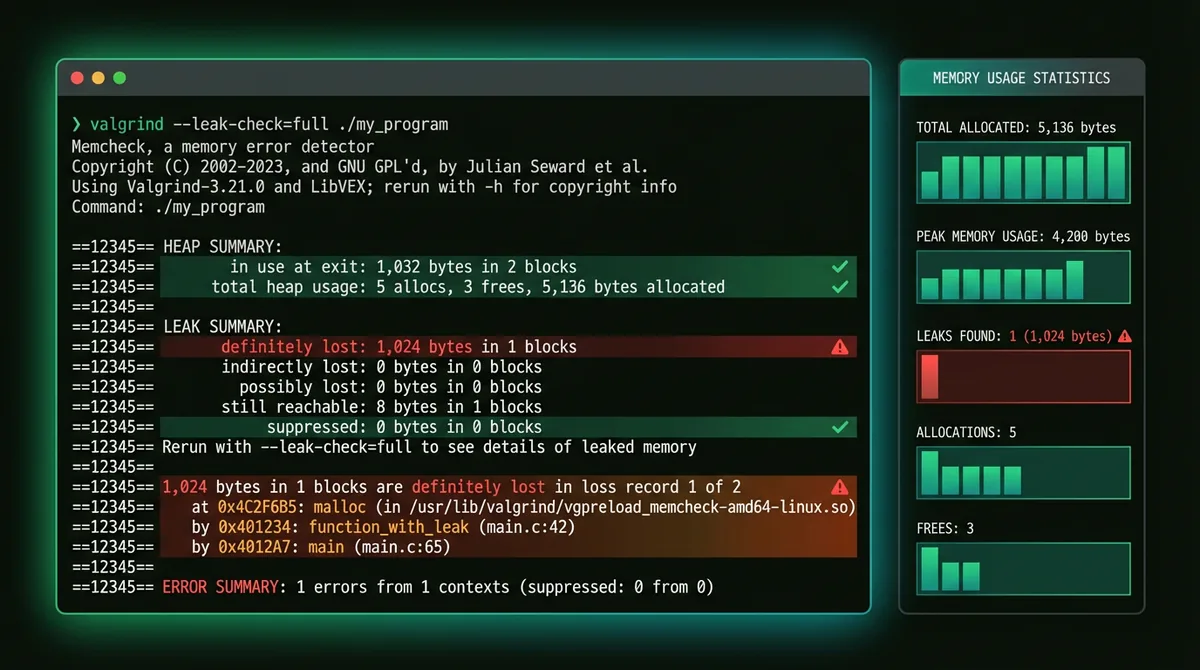
Leak debugging flow
Open Valgrind guide
01
Build with debug symbols so Valgrind can show useful file and line references.
02
Execute your program with leak checking enabled and inspect the reported call stacks.
03
Remove the leak or invalid access, then rerun Valgrind to confirm the report is gone.
Find memory leaks
Build with debug symbols so Valgrind can show useful file and line references.
Execute your program with leak checking enabled and inspect the reported call stacks.
Remove the leak or invalid access, then rerun Valgrind to confirm the report is gone.
Switch between Git practice and debugging topics depending on what you want to learn next.
Valgrind Learning
Memory error detection and profiling toolkit
GDB Learning
Powerful debugging for C/C++ programs with step-by-step execution, breakpoints and memory inspection.
Git practice game for commits, branches, and merges
Practice Git commands online in a visual playground. Make commits, create branches, and merge safely while training the same workflow used in real repositories.